
Text alerts from GC Front Office
GC Front Office is a product of GoThriveAI, LLC. It provides Grace, our AI-powered virtual assistant, who answers phone calls for building companies. When a call is urgent, or comes from a client or project the company has marked as priority, GC Front Office sends a text alert to the team members at the building company who have agreed to receive them.
These are operational alerts about calls. They are not marketing messages.
Program at a glance
- Program name: GC Front Office team alerts
- Who receives them: only the owner and team members of a building company that uses GC Front Office, and only after each person has agreed for themselves. We never text callers.
- Message types: urgent call alerts and priority call alerts.
- Frequency: message frequency varies.
- Cost: message and data rates may apply. GC Front Office does not charge for the texts.
- To stop: reply STOP to any message.
- For help: reply HELP, or email admin@gothriveai.com.
- Your information: we do not share mobile numbers or text message opt-in data with third parties or affiliates for marketing or promotional purposes. Read our Privacy Policy and Terms.
Did you call a business that uses GC Front Office? You do not get text messages from us. We never text callers. If you give an email address when you book an introductory call, your confirmation comes by email from our scheduling provider.
Who receives text alerts. A company owner and the team members who work for them, for example the project managers. A company owner cannot sign up another person. Each person agrees on their own, in their own account, using their own mobile number. Nobody at GoThriveAI, LLC or at the building company can agree on someone else's behalf. US mobile numbers only.
What the texts are
GC Front Office sends two kinds of text alerts: urgent call alerts and priority call alerts. A call is marked urgent when it cannot wait, such as an active leak. A call is marked priority when it comes from a client or project your company has marked as priority. A call can be both. Each text starts with "GC Front Office", has a fixed format, and includes the caller's name and phone number, and either a short reason (urgent) or the project name (priority). Texts never contain links or promotions.
Example texts (sample names and numbers):
GC Front Office URGENT: Dana Lee 615-555-0142, water leak at her house. Call back now. STOP to opt out
GC Front Office PRIORITY: Sam Ortiz 615-555-0163 called re Smith Kitchen. Call back today. STOP to opt out
GC Front Office URGENT+PRIORITY: Sam Ortiz 615-555-0163 re Smith Kitchen, water leak. Call back now. STOP to opt out
When texts are sent
- Alerts are sent automatically by GC Front Office's virtual assistant system when a call is urgent or is marked priority. A person does not type them.
- GC Front Office sends one text per alert to each team member who has agreed to receive them.
- Message frequency varies with how many urgent and priority calls your company gets.
Cost
GC Front Office does not charge for the texts. Message and data rates may apply from your mobile carrier.
How you opt in
- Every person who wants text alerts has their own personal login to the GC Front Office app. Logins are created for named team members. There is no public sign-up.
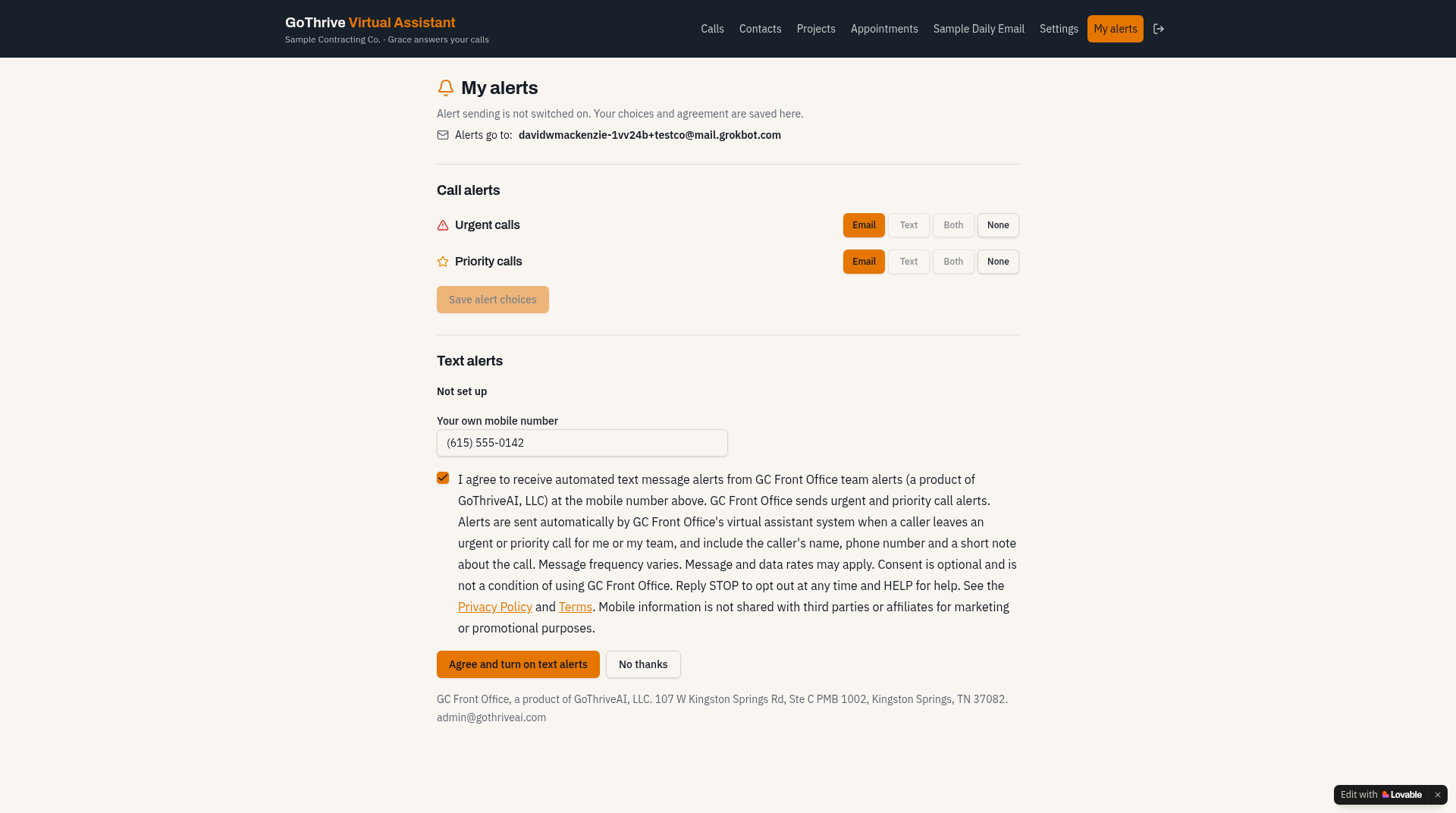
- The person signs in and opens the My alerts page. There they choose how to receive urgent and priority call alerts: email, text, both, or none.
- To receive texts, the person types their own mobile number and reads the consent statement.
- The consent box is empty by default. The person ticks it themselves to agree. It is separate from any other agreement, and it is optional.
- Only then can the person turn on texts. We record the person's name, mobile number, the date and time, and the exact consent wording they saw, with its version.
No one else, including the company owner and GC Front Office staff, can enter a number or agree for another person.
Agreeing to text alerts is not required to use GC Front Office. The same calls are in your GC Front Office dashboard, and you can choose email alerts instead.
I agree to receive automated text message alerts from GC Front Office team alerts (a product of GoThriveAI, LLC) at the mobile number above. GC Front Office sends urgent and priority call alerts. Alerts are sent automatically by GC Front Office's virtual assistant system when a caller leaves an urgent or priority call for me or my team, and include the caller's name, phone number and a short note about the call. Message frequency varies. Message and data rates may apply. Consent is optional and is not a condition of using GC Front Office. Reply STOP to opt out at any time and HELP for help. See the Privacy Policy and Terms. Mobile information is not shared with third parties or affiliates for marketing or promotional purposes.
Consent wording version: gcfo-sms-alerts-v1-2026-11
After you agree
GC Front Office sends you one confirmation text. It names the program, GC Front Office team alerts, says that message frequency varies, mentions that message and data rates may apply, and explains STOP and HELP. No alerts are sent to a number before that person's agreement is recorded.
From then on, GC Front Office sends you a text when a call is urgent, or when it comes from a client or project your company has marked as priority. Each text starts with "GC Front Office", has a fixed format, and includes the caller's name and phone number. Texts never contain links or promotions.
To stop: reply STOP to any message. You get one confirmation and no more texts from us. You can also turn texts off in My alerts, or email us at admin@gothriveai.com and we turn texts off for your number.
To start again: reply START.
For help: reply HELP, or email admin@gothriveai.com.
GoThriveAI, LLC (GC Front Office)
107 W Kingston Springs Rd, Ste C PMB 1002, Kingston Springs, TN 37082, United States
Email: admin@gothriveai.com